TS-Node is a Node.js package that we can use to execute TypeScript files or run TypeScript in a REPL environment.
To compile and run TypeScript directly from the command line, we need to install the compiler and ts-node globally.
npm install -g typescript
npm install -g ts-node
Usage:
# Execute a script as `node` + `tsc`.
ts-node file.ts
# or
# Start a TypeScript REPL.
ts-node
Set up a project
Initialize a node project using npm init and install typescript to the project.
npm install --save-dev typescript
Initialize typescript for the project.
npx tsc --init --rootDir src --outDir dist
This will generate a tsconfig.json file that will have a lot of options commented out. This file holds all configuration options for the TypeScript compiler. Here we have specified that .ts files will be in ./src and the compiler should deliver the compiled files in ./dist.
Let’s setup up some files to test this.
mkdir src
touch src/index.ts
Add some code to index.ts
console.log('It works');
We can now compile the code using npx tsc to generate JavaScript. The following code will be generated in ./dist/index.js
"use strict";
console.log('It works');
Install @types/node to the project so the compiler can enable strong typing and our IDE can give suggestions when we need them.
npm install @types/node --save-dev
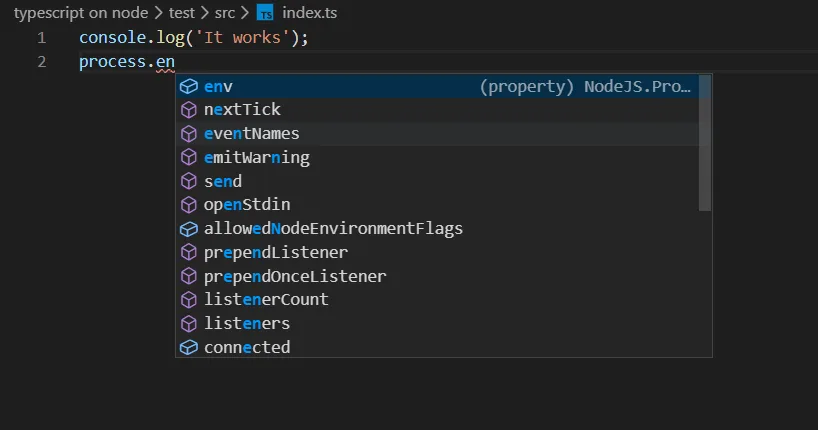
Execution in Development
We can now set up an execution flow in the project that will keep watch over the files we are working on and re-run the project if there are any changes.
For this we will use ts-node and nodemon*.* Nodemon is a utility that will monitor for any changes in the source and automatically restart the execution command configured.
# Install
npm install — save-dev ts-node nodemon# Execute
npx nodemon --exec ts-node ./src/index.ts  --watch src --ext .ts
Here we are telling nodemon to execute ts-node ./src/index.ts and watch the directory ./src for changes in .ts files
To make life a bit easier we can add this command to package.json under scripts so we don’t have to write all the options again.
“dev”: “nodemon --exec ts-node ./src/index.ts --watch src --ext .ts”
We can now use npm run dev to run the project. We don’t need npx when running commands from package.json.
Execution in Production
TS node is fine for development use but it is not recommended for production setups. For production we should compile all our TypeScript into JavaScript and run the application from ./dist
We have almost everything we need to set up a production build flow. We just need a way to clean the ./dist before the compilations setup. Rimraf is a cross-platform equivalent for rm -rf
npm install --save-dev rimraf
Now just add the following commands under scripts.
"prebuild": "rimraf ./dist",
"build": "tsc",
"start": "npm run build && node ./dist/index.js"
Here we are using a prebuild script to delete ./dist using rimraf before running thebuild script to keep the build clean. We can now use npm start to rebuild and run the project.
Note
We have installed all our packages using the --save-dev flag. In production, if we use npm install --production these packages will be skipped. In this case, I suggest running the build step and start separately while also using gulp or some other automation solution to generate another package.json file for production to deploy only the built code instead of the entire codebase to the production server.
Example using gulp:
Install gulp
npm install gulp --save-dev
Create a gulpfile.js and add the following code to it. There are some extra AWS Elastic beanstalk related commands in this as an example. Remove them if they are not required.
const { src, dest, parallel } = require('gulp');function copy_elx() { // AWS ELASTIC BEANSTALK EXTRA CONFIG
    return src('./.ebextensions/**')
    .pipe(dest('build/.ebextensions'))
}function copy_elb() { // AWS ELASTIC BEANSTALK EXTRA CONFIG
    return src('./.elasticbeanstalk/**')
    .pipe(dest('build/.elasticbeanstalk'))
}function copy_root() {
    return src([
        './.npmrc', // REMOVE IF AWS node-gyp works fine without it
        './package-lock.json',
        './.env', // REMOVE IF NOT USING dotenv
        './package.json'
        ])
    .pipe(dest('build/'))
}const build = parallel(copy_elb, copy_root, copy_elx);
exports.build = build;
exports.default = build;
Change the out directory(outDir) in tsconfig.json to ./build/dist and change the build command and start commands in package.json.
"prebuild": "rimraf ./build",
“build”: “tsc && gulp build”,
"start": "node ./dist/index.js"
Now we can run npm run build and move everything inside the ./build directory to our production environment then run it after our packages are installed using npm install --productionwithout issues.
More info: TS-Node, tsconfig.json